



pH Meter
페이지 정보
작성자관리자 댓글 0 조회Views 916 작성일Date 23-03-06 15:30본문

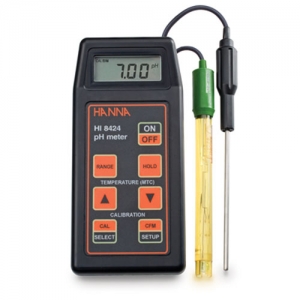
1. Remove the pH meter from its storage solution, rinse it with distilled water, and gently wipe the exterior (avoiding the electrode itself) with a Kimwipes or equivalent.
2. Immerse the electrode in one of the standard pH solutions, starting with the pH 4.00 solution. Hold the meter steady, ensuring the electrode does not touch the bottom, and gently swirl the solution. When the pH reading on the screen stops changing after swirling is stopped, press the 'Cal' button to confirm the pH 4.00 calibration. (If the pH reading changes after stopping the swirl, repeat the swirling process for 30 seconds to 1 minute.)
3. Repeat the rinsing process described in step 1.
4. Calibrate the meter using pH 7.01 and pH 10.00 solutions in the same manner. (It is best to use the standard solution closest to your desired pH value last.)
5. Place a magnetic stir bar into the sample solution you wish to measure, and immerse the electrode into the solution, ensuring it does not touch the bottom, while stirring.
6. Record the pH reading.Adjust the solution to the desired pH by adding HCl or NaCl drop by drop.
Comment List
No comments yet